


Classic Words With Friends
4.2555.23K Reviews
App Specs
- Version
- 57.01.01
- Updated On
- License
- Free
- Downloads
- 50,000,000+
- Developer
- Zynga
- Categories
- Word
- Platform
- Android, iOS
Screenshots
 Analysis by AppCompare
Hey there, word wizards! If you're like me and love a good challenge mixed with some friendly competition, then you’ve probably heard of Classic Words With Friends. This game has been around for a while, and it's no surprise why it’s still a favorite among word game enthusiasts. Let’s dive into what makes this app a staple on my phone.
A shared game that fits around real life
I find this kind of word game works best in a household when it is treated as a small, ongoing activity rather than something everyone has to play at the same time. Someone can make a move during a quiet break, and another person can respond when they have a moment. That suits people whose schedules do not line up, and it gives a shared game a gentler rhythm than a fast, turn-by-turn contest.
A realistic example is a parent and an older child taking turns after dinner, or siblings keeping a match going while they are in different places. The board gives them something specific to talk about: a clever placement, a missed scoring opportunity, or a disputed word. I would not rely on it as a substitute for a conversation, but it can provide an easy reason to check in.
Guides and Analysis on Classic Words With Friends
There is a trade-off to that relaxed pace. If everyone wants immediate action, waiting for another move can make a match feel stalled. I would agree on expectations before starting with someone who tends to forget ongoing games; otherwise, the board can become an unfinished obligation instead of a pleasant shared routine.
Keep shared devices and accounts separate
On a phone or tablet used by several people, I would decide whose account is being used before opening a match. A personal game account should not automatically become a household account simply because the device is shared. Keeping play under one person’s identity makes it clearer who is responding to opponents and who is responsible for any conversations connected with a game.
If different family members want their own opponents and progress, separate personal access is the cleaner arrangement where available. I would avoid passing a device around while leaving one player’s chat open, especially when younger players are involved. This is less about complicated setup and more about making expectations clear: whose turn it is, who can send messages, and whether someone else may use that account.
It is also worth agreeing on a simple routine for handoffs. A player can finish a move, put the device away, and let the next person know that a response is waiting, rather than having several people make decisions under one identity. That small boundary prevents confusion over moves and avoids giving opponents the impression that one person is replying when someone else is actually holding the device.
Worth Reading Before You Choose

Ludo King Makes the Most of the Minutes Between Plans

Baby Panda World Brings Quick Play to Modern Phones, but Its Game Library Feels Busy

ESPN’s Live Game View Makes Following Close Games Easier

QuizzLand Review: A Good Fit for Short Trivia Breaks, Not Every Player

Basketball Stars: Multiplayer Is Fast, but Can It Recover When Matches Go Wrong?

WEBTOON Turns Phone Updates Into a Better Reading Routine
Getting Started: A Simple Yet Engaging Interface
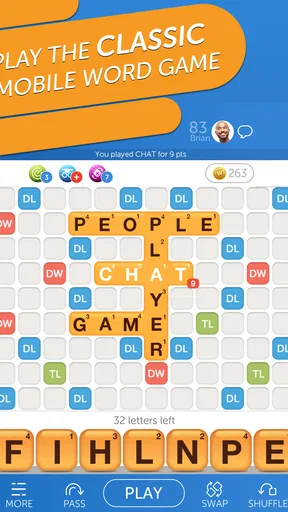
The first thing you'll notice when you fire up Classic Words With Friends is its clean and inviting interface. Whether you're a newbie or a seasoned player, the layout makes it super easy to jump right in. The colors are vibrant without being too overwhelming, and the tiles are big enough that even my grandma could see them without her glasses!
Starting a game is straightforward. You can choose to play against a friend, a random opponent, or even the computer if you're feeling a bit anti-social. The app does a great job of pairing you with players of similar skill levels, so you're always in for a fair fight. Trust me, there’s nothing worse than getting crushed by a dictionary-wielding pro when you’re just trying to have fun.
Features That Keep You Hooked
Now, let’s talk about the features. One of my favorite things is the in-game chat. It’s perfect for some light-hearted banter or even trash talk if that’s your style. But be nice! It’s all in good fun.
When I play with friends who have uneven word-game experience, I find it helps to treat a dictionary challenge as a chance to learn rather than a way to win an argument. The built-in word validation settles whether a play is accepted, but it does not make every unfamiliar word memorable. I sometimes note a surprising word mentally and try to use it later; that turns a disputed tile into a small vocabulary lesson instead of a source of frustration.
Chat can make a match feel personal, but it also changes the experience from a quiet puzzle into a social one. If I am playing with someone I know, a short comment about a tricky play adds warmth. Against a random opponent, I would keep messages friendly and avoid sharing personal details. Anyone choosing the game for a younger player should talk through that distinction and supervise use in a way that fits their household.
Another cool feature is the word validation. Ever been stuck wondering if "qi" is a real word? The app has got your back with its built-in dictionary. It’s a lifesaver and a great way to expand your vocabulary. Plus, it prevents those awkward "that’s not a word!" arguments that could end friendships.
A practical way to use validation is to separate learning from score-chasing. I might look at an accepted word after a match and think about why it worked, rather than interrupting every turn to search for the highest-scoring possibility. That keeps a casual game moving and makes it more enjoyable for a mixed-skill group. For serious study, though, I would use a dedicated word reference as well; a game dictionary is useful during play, not a replacement for a full language resource.
Let’s not forget about the leaderboards and achievements. If you’re the competitive type, climbing up the ranks and collecting achievements can be seriously addictive. It’s like getting a pat on the back and a high-five from the app every time you hit a milestone.
Those competitive markers are best treated as optional motivation. In a family match, comparing everyone’s standing too closely can turn a relaxed pastime into a test, particularly when players have different amounts of experience or free time. I prefer setting a small personal goal, such as trying a new placement or spotting a better use for a premium square, instead of making every session about rank.
Choosing it over other word games
Compared with a printed crossword, this game is more social and less solitary: you are building words on a shared board rather than filling a fixed set of clues. Compared with a quick word-search or a timed puzzle, it puts more weight on planning and on the other player’s response. That is exactly why I reach for it when I want a game that can continue between errands, but it is not my first choice when I have only a minute and want an immediate finish.
The board rewards more than a large vocabulary. A short word can be a smart move if it uses a high-value letter or prevents the other player from reaching a premium space. I try to look at the open squares around a placement before committing, not just the points shown for the word itself. This is a useful habit for new players because it makes strategy feel learnable without requiring them to memorize long word lists.
For someone who dislikes competition, the computer option offers a way to practice without asking a friend to keep pace. I would use it to get comfortable with the board and scoring, then move to a friend match if the social side sounds appealing. If the main goal is a solo puzzle with a definite endpoint, a conventional crossword is likely a better fit; the continuing opponent-driven format is central to this game’s appeal.
Features That Keep You Hooked
One thing I would keep in mind before installing is the difference between free access and optional spending. The game is free to download, while in-app purchases are available, with items priced from $0.99 to $149.99. I would check purchase settings on a shared device and make sure younger players understand that a purchase is not necessary just to enjoy a word match. That conversation is especially useful when a child can access the payment method attached to the device.
The game is made by Zynga and is rated Everyone, which makes it broadly suitable by age rating, but that label does not replace household rules about chatting, screen time, or spending. I would decide those boundaries before handing over a shared device. The game can be a pleasant fit for older children who enjoy spelling and turn-based competition, while a younger child may need help understanding the social and purchase parts as well as the board.
On the technical side, the current version is 49.01.02 and the minimum operating-system requirement is 6.0. It has been available since February 14, 2011, and its long-running audience is reflected in an average rating of 4.0 from around 1.7 million ratings, alongside roughly 562,000 written reviews and more than 50 million installs. I mention that scale as context, not as a promise that every opponent or match will suit a new player.
When I would choose something else
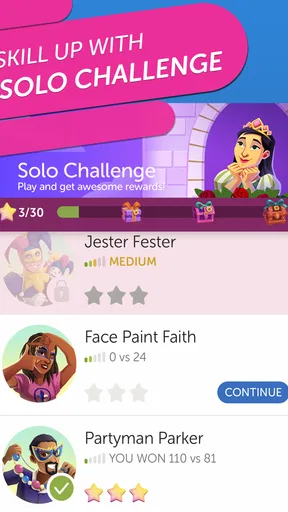
I would skip this one if I wanted a fully private, offline-feeling puzzle with no opponent, or if waiting for another person to play would irritate me. A crossword app is a better choice for clue-solving, while a short solo word challenge suits a quick break more neatly. I would also look elsewhere if the household wants a game with explicit shared-family controls; I would not assume that a general word game provides those just because several people can enjoy it.
For people who like learning through play, it is a good match when the goal is to think about letters, board position, and an opponent’s choices without racing a clock. New players can start casually and improve by reviewing what made a move effective. More experienced players may enjoy the tactical choices, though someone seeking a deep tournament environment may find a casual mobile match less satisfying than a dedicated competitive setting.
Why It Stands Out
So, what makes Classic Words With Friends stand out in a sea of word games? For me, it's the balance between simplicity and challenge. The game is easy enough to pick up, but as you start playing, you realize there's a lot of strategy involved. It’s not just about making the longest word; it’s about placement, blocking your opponent, and maximizing those double and triple word scores.
Plus, the social aspect is a huge draw. It’s a great way to keep in touch with friends and family, especially if you’re like me and live far away from your loved ones. A quick game can easily turn into a fun chat session, and before you know it, an hour has flown by.
Final Thoughts: A Must-Have for Word Lovers
In conclusion, Classic Words With Friends is more than just a game; it’s an experience that combines fun, learning, and social interaction. Whether you're looking to kill some time, improve your vocabulary, or connect with friends, this app has something for everyone. So, why not give it a shot? Download it, challenge your friends, and see who the real wordsmith is. Just remember to play nice and have fun!
Pros
- Engaging word puzzles enhance vocabulary.
- Smooth interface with intuitive navigation.
- Multiplayer mode for competitive fun.
- Offline play available
- no internet needed.
- Regular updates with new features.
Cons
- Limited themes for game customization.
- Occasional in-app purchase prompts.
- Ads can be distracting during play.
- No cross-platform play support.
- Slow loading times on older devices.
FAQs for Classic Words With Friends
What is Classic Words With Friends?
Classic Words With Friends is a social word game that allows players to compete against friends or random opponents to build words on a Scrabble-style board. It's available for both Android and iOS devices, providing a fun and engaging way to improve your vocabulary and strategic thinking skills.
Is an internet connection required to play Classic Words With Friends?
Yes, an internet connection is required to play Classic Words With Friends. The game relies on online connectivity to match you with opponents, access leaderboards, and sync your game progress. However, there may be some offline features, such as practice modes or single-player options, depending on the version you are using.
Are there in-app purchases in Classic Words With Friends?
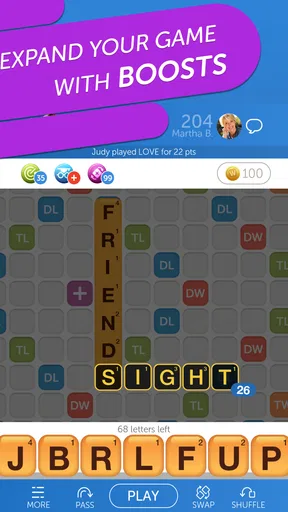
Yes, Classic Words With Friends includes in-app purchases. These purchases typically offer additional features, such as ad-free experiences, special boosts, or extra coins. While the game is free to download and play, these purchases can enhance your gameplay experience, but they are entirely optional.
How does the matchmaking system work in Classic Words With Friends?
The matchmaking system in Classic Words With Friends pairs you with players of similar skill levels based on your ranking and past performance. You can also invite friends directly to play by connecting through social media or using their usernames. This ensures a balanced and enjoyable game for all participants.
Can I play Classic Words With Friends across different devices?
Yes, you can play Classic Words With Friends across different devices by logging into your account. This feature allows you to seamlessly switch between your phone, tablet, or any other compatible device without losing your progress. Just ensure you are connected to the same account on all devices.


